Website & domain health monitoringSimple for beginners. Powerful for experts.
WWT watches your websites around the clock: uptime, certificates, domain renewals and email security. Alerts land where you want them, written so both a business owner and an engineer know what just happened and what to do next.
Not ready to sign up yet? Try the demo - no registration required.
Made by people who've been on the other end of the alert.
WWT was built by people who have spent thirty years running production systems: renewing certificates that 'just expired', recovering domains that quietly lapsed, answering the 2am phone call. At some point you start building the tool you always wished had been watching.
If you're not technical, this is the friend who quietly checks every morning whether your company website still answers, whether the domain is still in your name, whether the certificate won't trip a browser warning next week. You don't need to know what TLSv1.0 is - we'll only tell you in plain language when it actually matters.
If you are technical, this is the same friend with all the knobs visible: per-site failure thresholds, parallel checks, an audit log of every alert, RDAP for domain registrars, SPF/DMARC drift detection and nine notification channels, each in its own language. Built by people who have done the on-call rotation themselves.
A monitoring tool should not be a luxury. WWT has a free plan that covers real needs, and the paid plans - for more domains or one-minute checks - are priced to be fair. Whether you run one company site or a hundred client domains, you only start paying if you outgrow free.
- the WWT crew
Meet the people behind WWT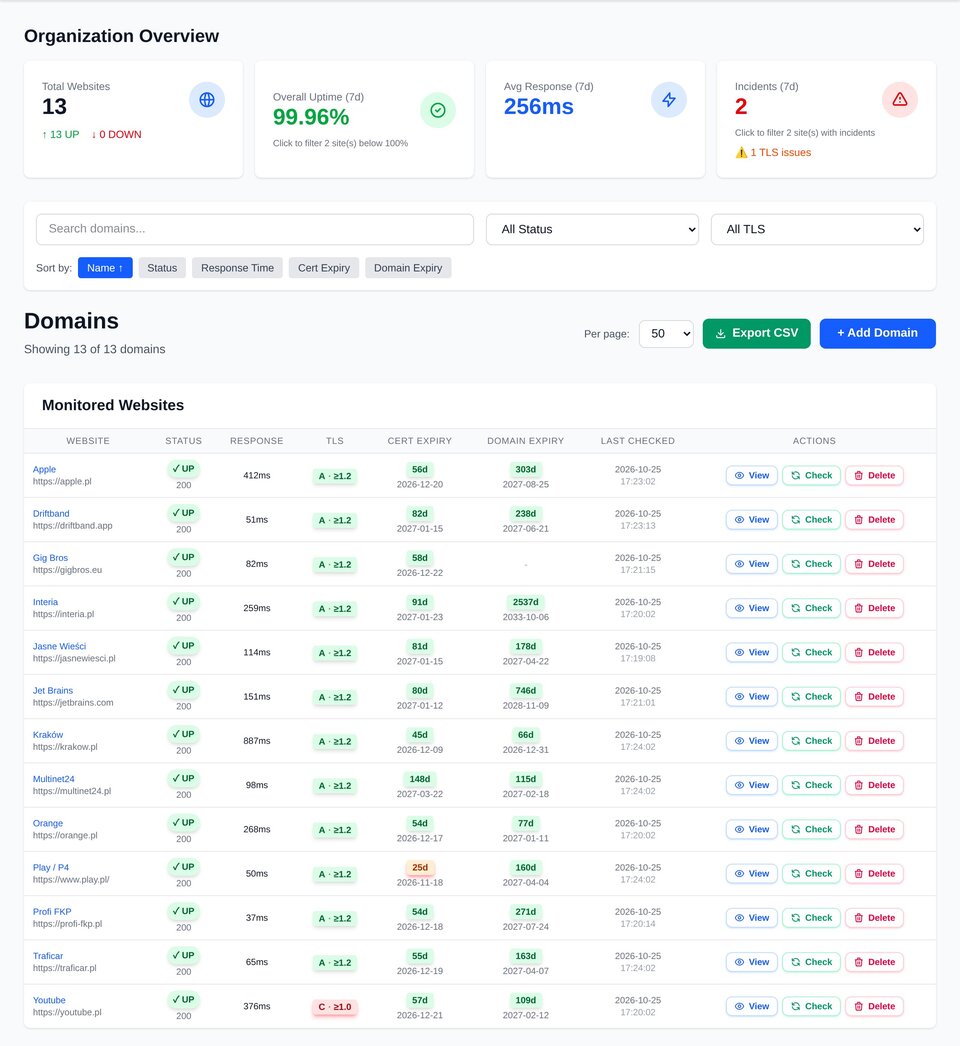
Built for the whole team.
Whether you look after a single company site or hundreds of client domains, you set WWT up once and forget the XLS files and the text files. Everything in one place.
You hear about problems before your customers do.
WWT keeps track of domain renewals, certificate expiry dates and the availability of every site your business depends on. Adding a domain takes about a minute; after that you get a clear message whenever something needs your attention.
- Domain registration expiry alerts on a five-step schedule (30, 14, 7, 3, 1 day)
- SSL certificate expiry alerts on the same schedule
- Notifications written in clear language - no log dumps, no jargon
- CSV bulk import to onboard an entire portfolio in one upload
All the controls you actually need.
Per-site failure thresholds, parallel workers, minute-precise recovery detection and an audit log of every alert. SPF, DMARC, DKIM and TLS versions are checked daily, record by record, so a quiet change gets caught before it grows into an incident.
- Per-site failure-count threshold filters out flapping checks; response time and TLS change alerts catch the quiet problems
- Up to 15 parallel workers - capacity grows with your portfolio
- Email, Slack, Teams, Discord, Mattermost, Telegram, PagerDuty, Pushover, Webhook - independently routable per channel, each in its own language
- Audit log: every alert, every suppression, every override
Every client domain in one place
Certificates, domain renewals and uptime across your whole client portfolio, so you hear about it first and not from the client.
No false alarms
A hiccup is not an outage.
Monitoring tools love to page you for a packet that got lost on the way. WWT confirms before it alerts.
1. A check fails
Our server in Poland could not get a healthy answer. Nothing is sent yet.
2. Two regions confirm
Two independent monitoring regions on other continents, rotated every hour, check the same site. If either sees it working, the failure is discarded as a local network problem.
3. The threshold is reached
Only when confirmed failures repeat in a row (3 by default, your choice per site) does an incident open and alerts go out. Recovery is announced after real successes, not after one lucky response.
One clear dashboard.
Uptime, performance, certificates, domain registration and email security in a single dashboard - instead of five separate services.
Uptime monitoring
Per-minute HTTP checks with parallel workers. Configurable per-site interval and timeout.
Multi-region verification
When your site looks down, we re-check it from independent regions in Europe and North America before alerting you. A network blip near our servers stays quiet - only a real outage gets through.
Performance tracking
Response time logged on every check. Charts from one hour to a year.
Response time alerts
A site that answers slowly is a problem uptime checks never see. Pick a threshold from 800 ms to 10 s and how many consecutive checks must exceed it; you get one notice when it slows down and one when it is back to normal.
TLS version reporting
Daily report of which TLS protocol versions your server actually negotiates.
TLS version change alerts
The daily TLS check remembers the highest protocol version a site accepts. A drop to an older version is a critical alert with the version before and after; a rise is good news, delivered the same way.
Domain expiry (RDAP)
Live registrar lookup with a manual override for unsupported TLDs.
Email alerts
Plain-English notifications you can hand to a non-technical recipient.
One digest, not a flood
Lots of domains renewing at once? WWT bundles their expiry alerts into a single tidy message per channel, grouped by urgency - so the ones that matter don't drown in noise.
SLA target and compliance
Set a monthly availability target per monitor. The downtime budget is visible all month, each closed month is judged once and kept as evidence, and alerts fire when the budget runs out or a month closes below target.
Public status pages
Prove you control the domain and the monitor gets a page at /status/your-domain, a place in the public directory and an embeddable badge. Or share a page by link only, with expiry and revocation.
Team collaboration
Multiple owners and members per organization, multi-org switching, role-based access.
Certificate expiry
Days remaining on the X.509 cert, with notifications at 30 / 14 / 7 / 3 / 1 days.
HTTP status filtering
Choose per-site which response classes count as success: 2xx, 3xx, 4xx, 5xx.
Multi-channel alerts
Email, Slack, Teams, Discord, Mattermost, Telegram, PagerDuty, Pushover and Webhook - every channel has a Test button and its own language setting.
SPF / DMARC / DKIM
Daily email-security record checks with the parsed record on display.
Audit log
Every notification, suppression, settings change and override is recorded.
CSV import & export
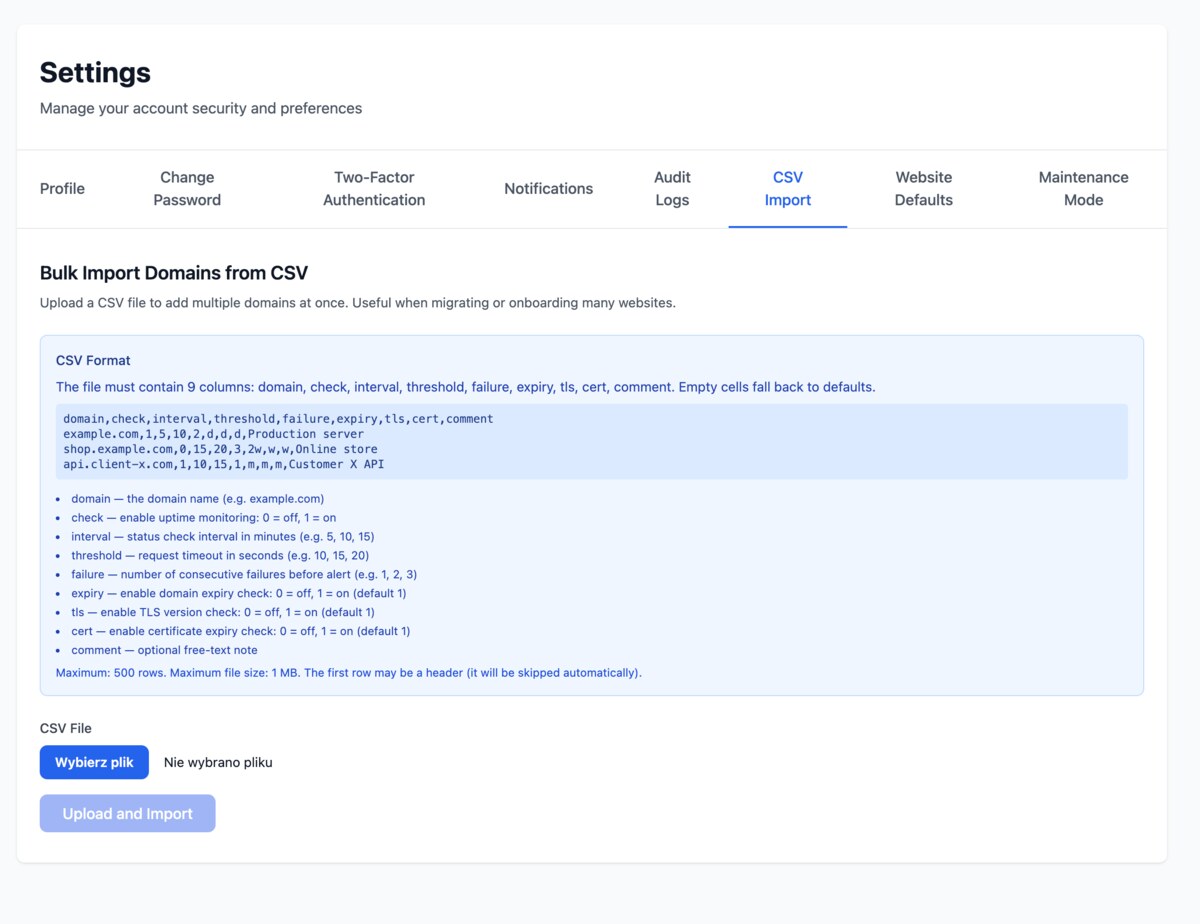
Bulk import websites with a 9-column CSV. Export the full list at any time.
Data export
Export everything WWT knows about you, at any time - in a single click.
Two-factor authentication
Protect your account with an authenticator app, a hardware security key or a passkey - use one method or combine them.
See WWT at work.
Real screenshots from the live application.
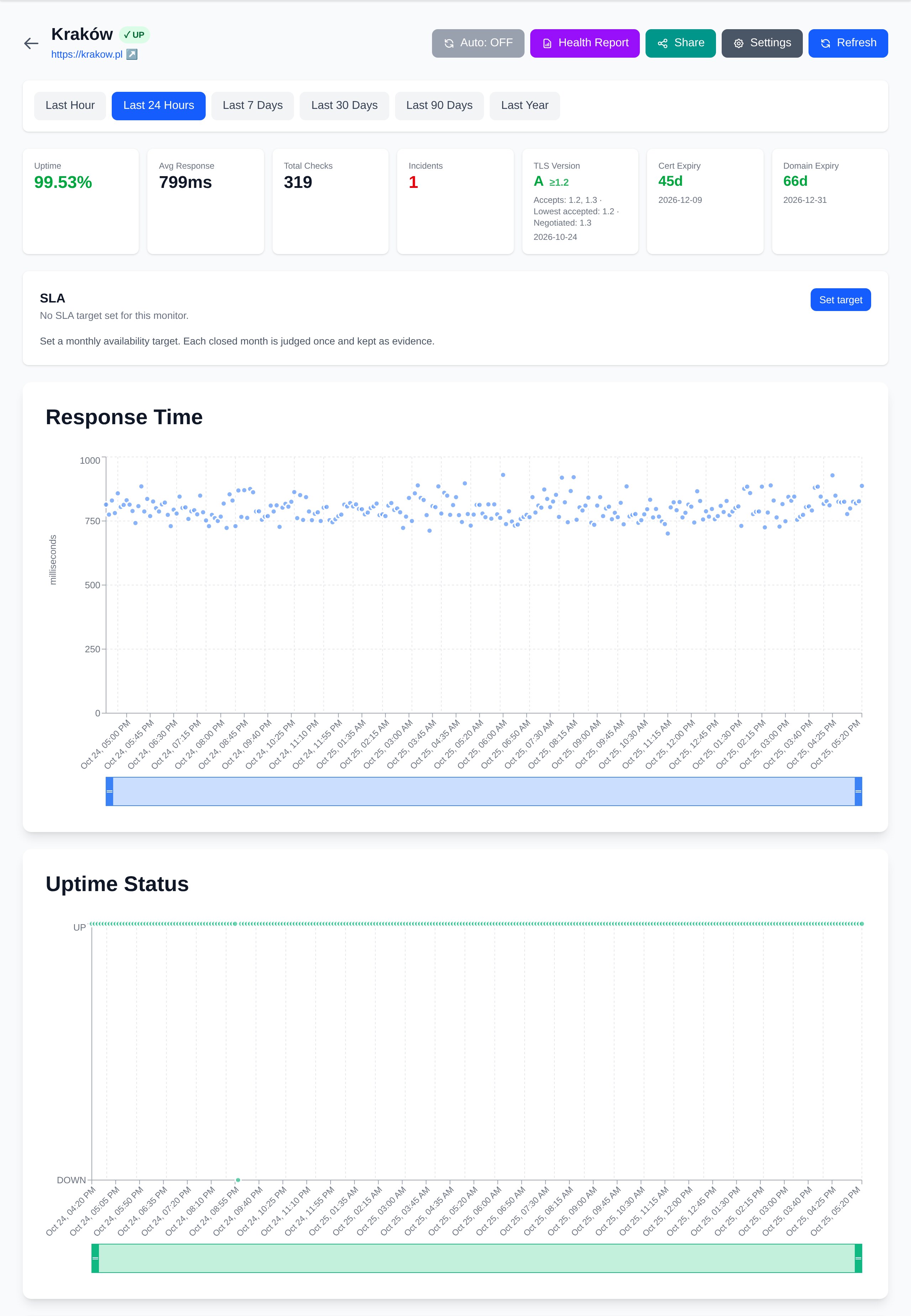
Every check, on one timeline.
Open a website to see uptime, response time, TLS version, certificate expiry, domain registration and recent checks - with chart ranges from one hour to a year.
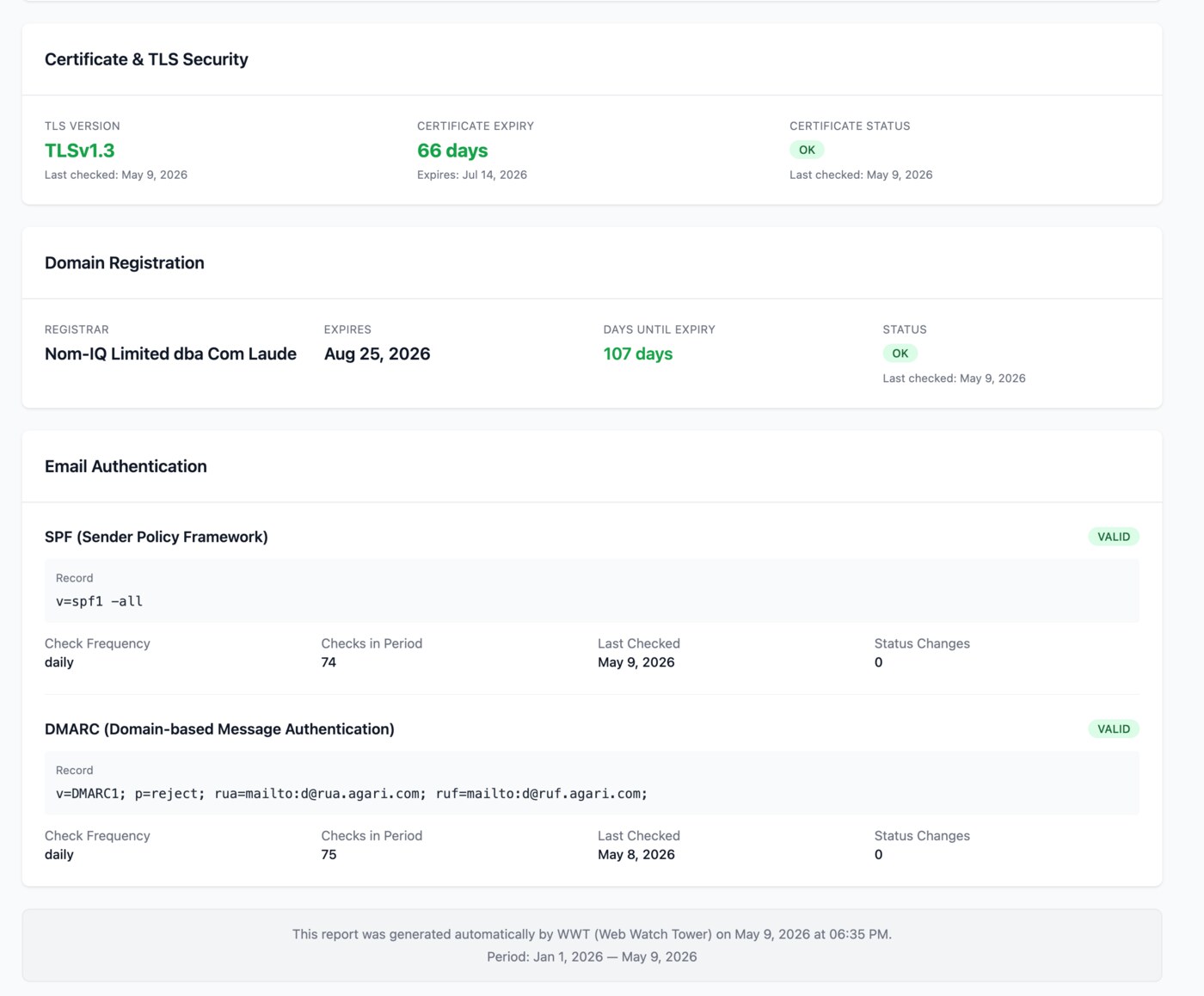
TLS, cert, registrar, SPF, DMARC.
Every security signal that matters, in one panel - with the underlying record on display so you can verify what was actually checked.
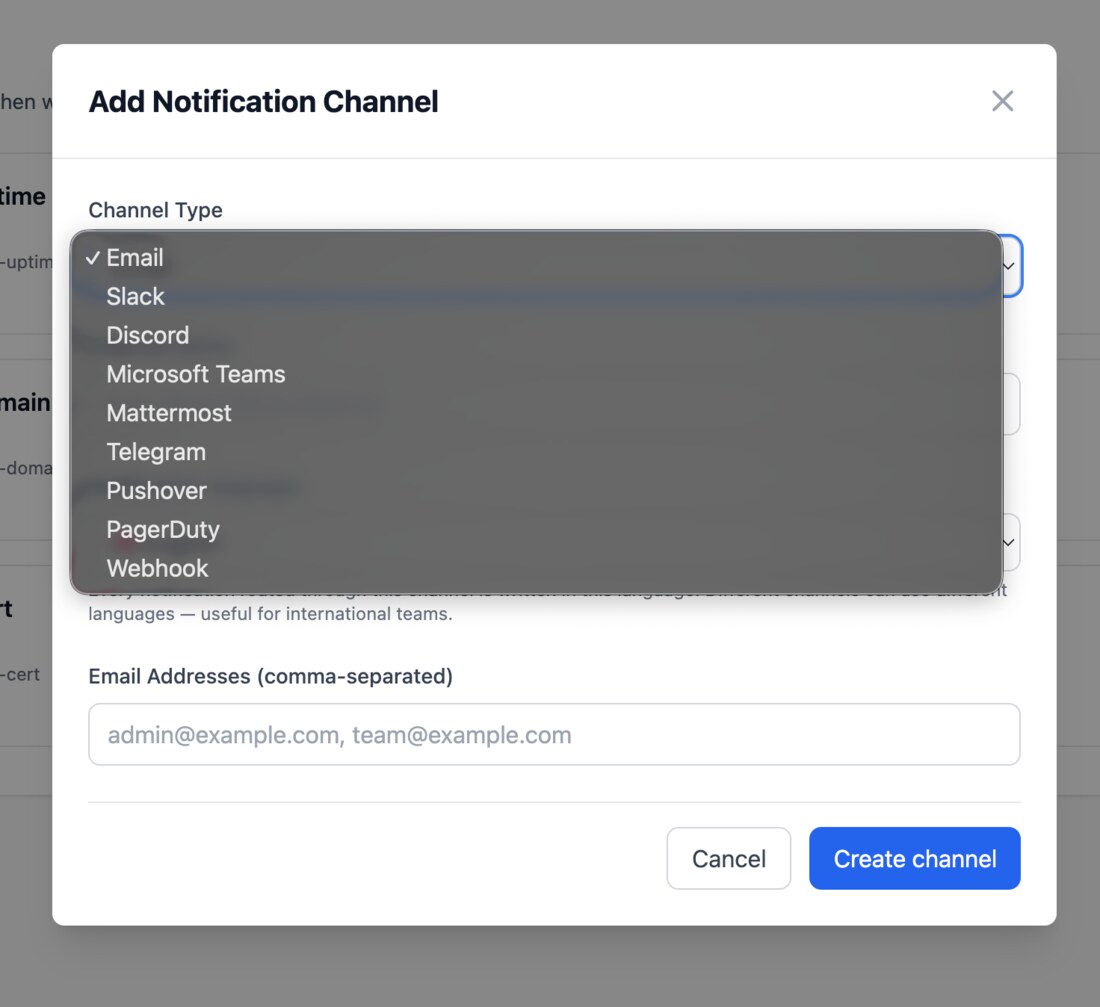
The right person, the right channel.
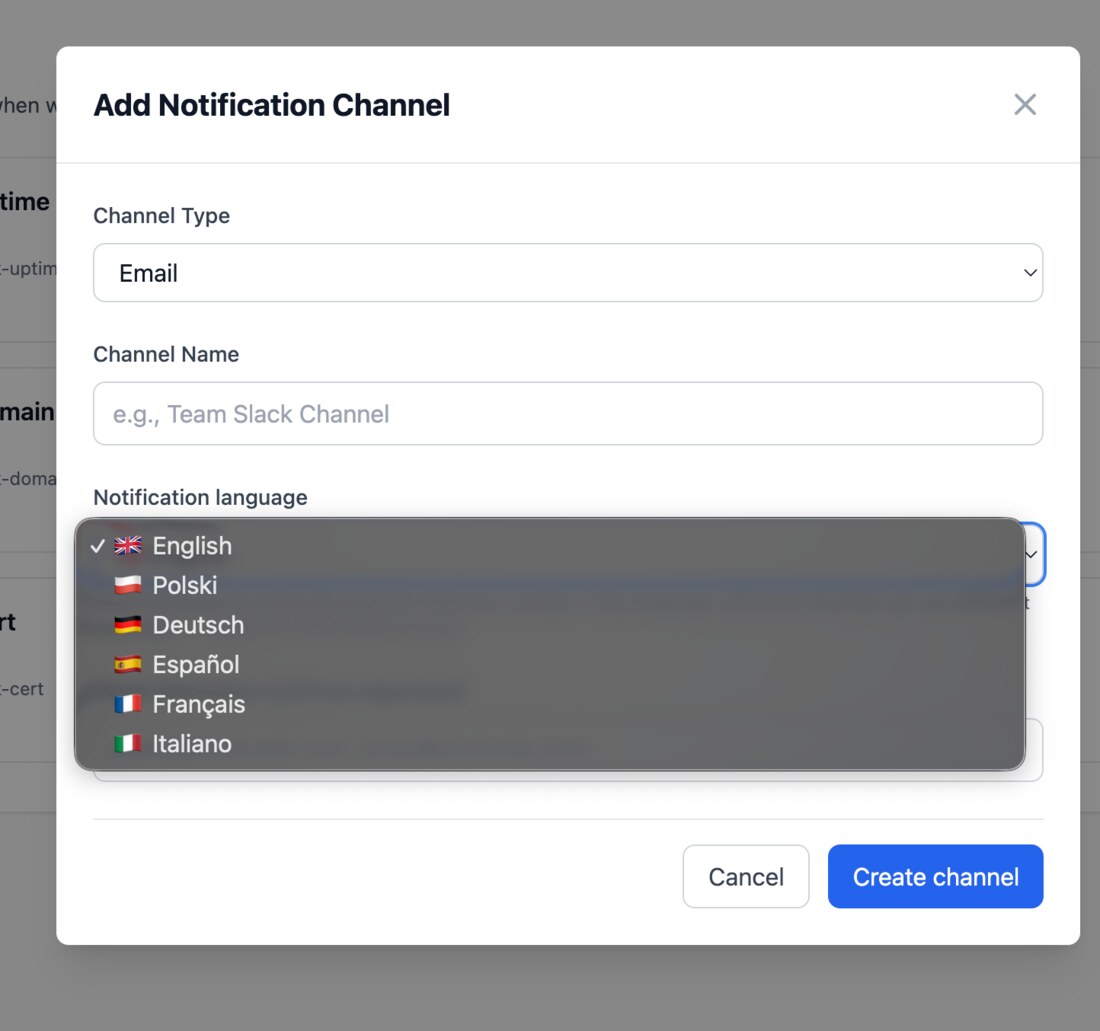
Add as many channels as you need - Email, Slack, Teams, Discord, Mattermost, Telegram, PagerDuty, Pushover or your own webhook - and decide which of the six event types each channel receives: uptime, response time, domain expiry, certificate expiry, TLS changes, SLA.
Hundreds of domains - one upload.
You don't have to add domains one at a time. Upload a single CSV with up to 100 rows and every site arrives with the right interval, threshold and check settings. Useful when you migrate from another tool or take over a whole portfolio.
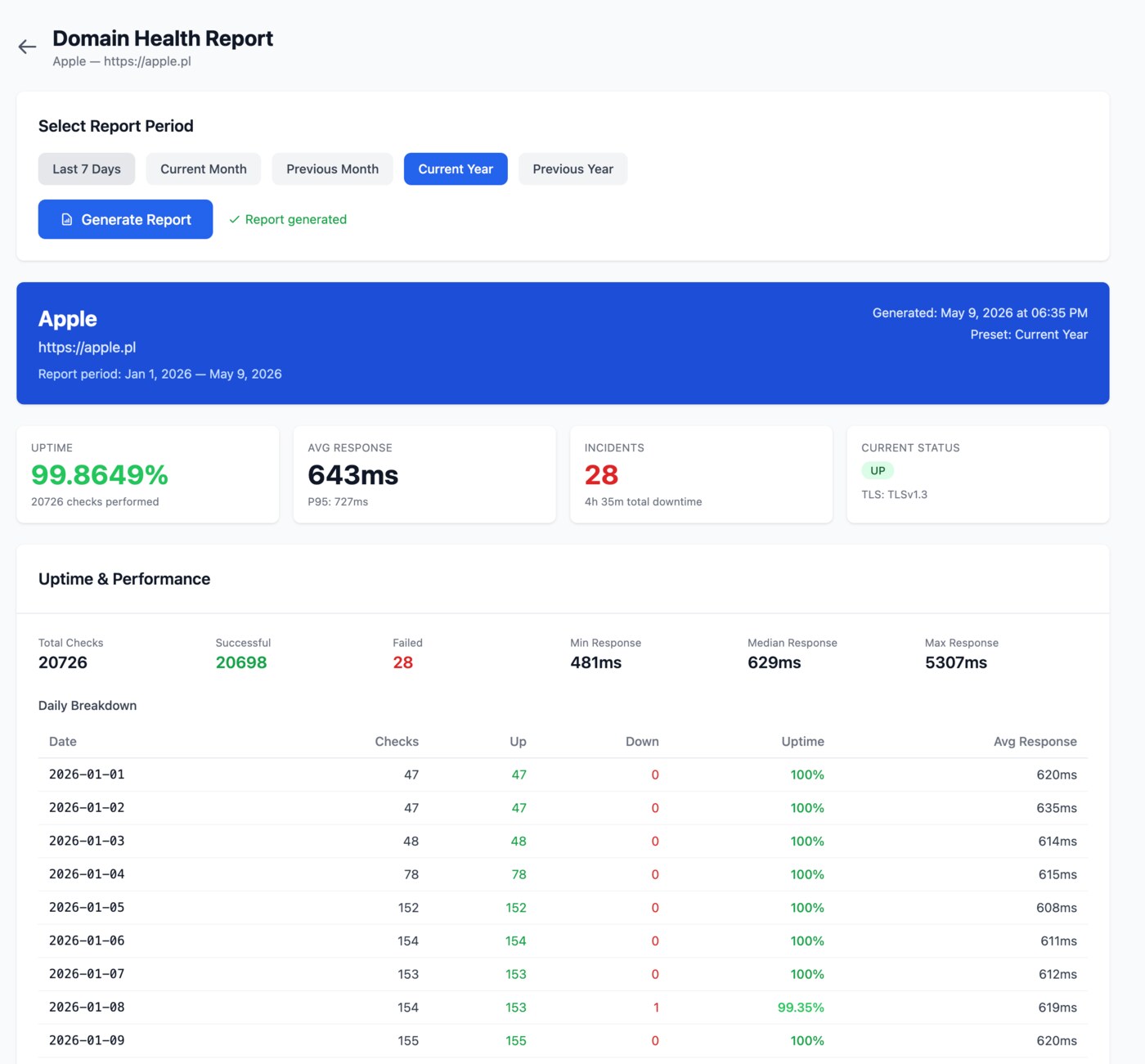
A report you can hand to anyone.
A one-click summary of uptime, response time percentiles, incidents and the current security posture - formatted so it reads well on screen, in print or as a PDF.
New domains start with your defaults.
Set the default check interval, timeout, failure threshold, accepted HTTP codes and daily checks once, at the organization level. Every new domain starts from that template, and existing sites are never changed behind your back.
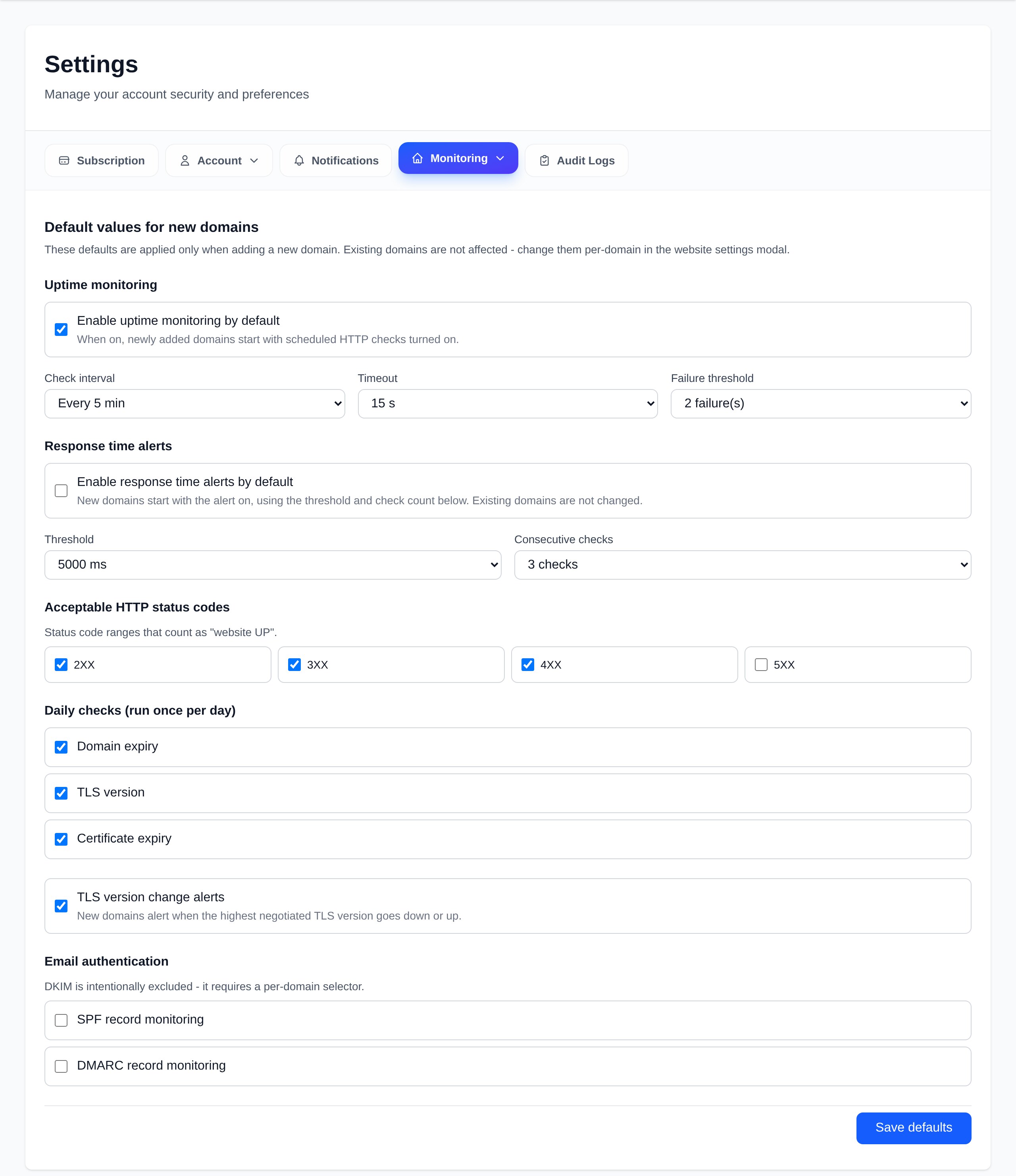
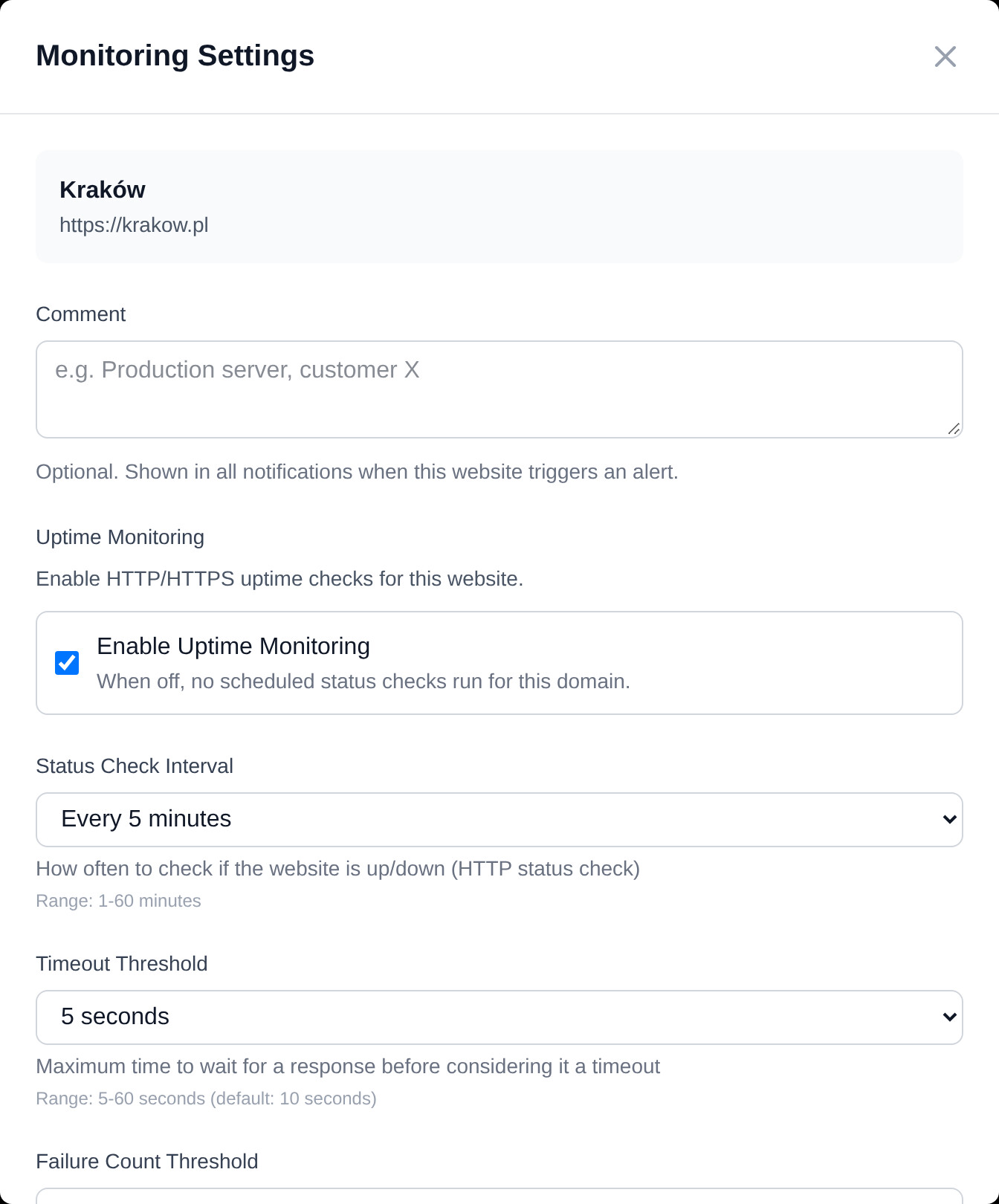
Override anything, on any single domain.
Some sites need their own rules: a slow backend that wants a longer timeout, a production site you check every minute, a staging URL that returns 4xx on purpose, a shop that should warn when it answers in over two seconds. Open the settings of any single domain and override the interval, timeout, failure threshold, accepted codes, daily checks, response time threshold and TLS change alerts.
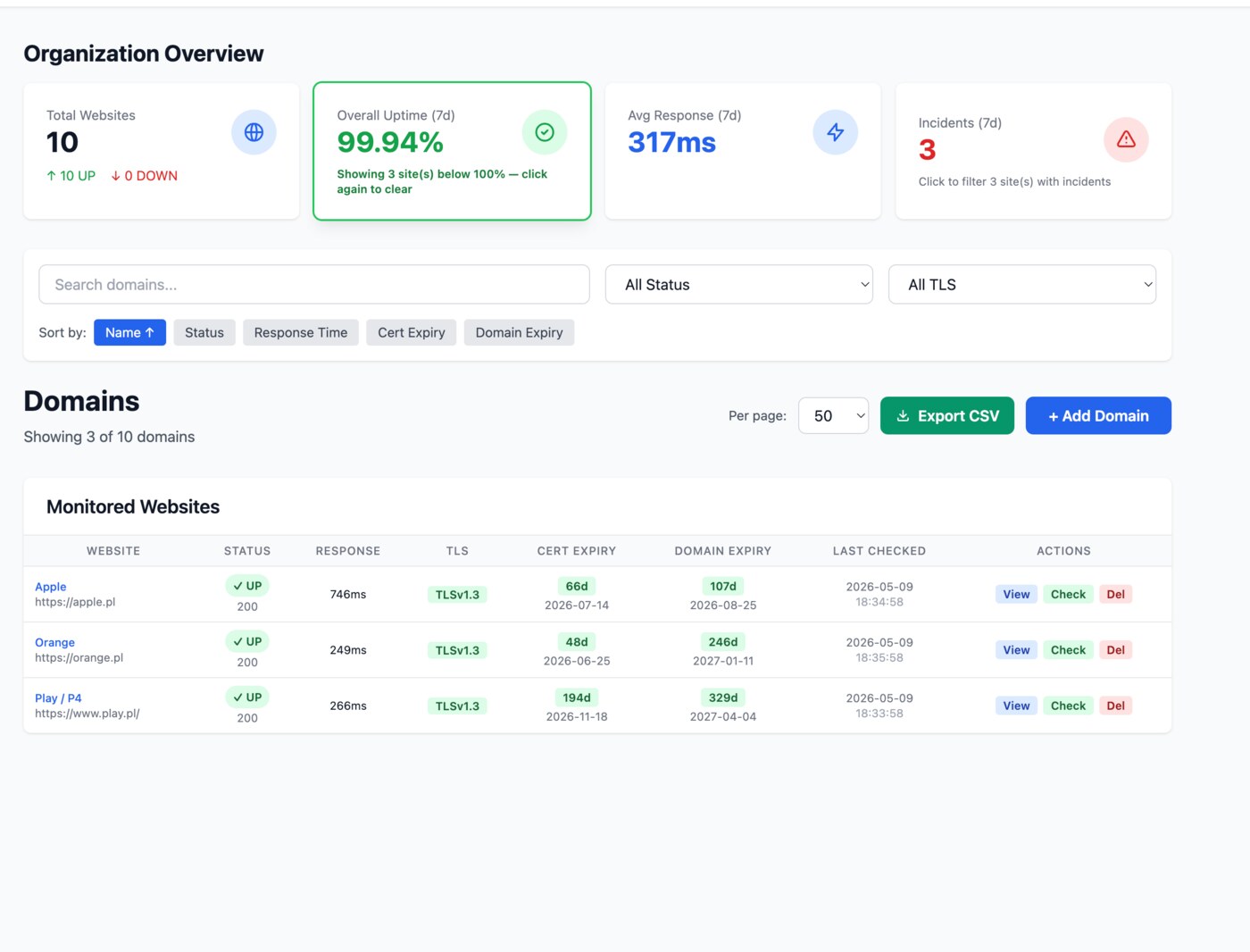
The stat cards double as filters.
Click the uptime card on the dashboard to see only the sites below 100% in the last week, or the incidents card for the ones that actually went down. Together with search and column sorting, you get to the right site in a couple of clicks.
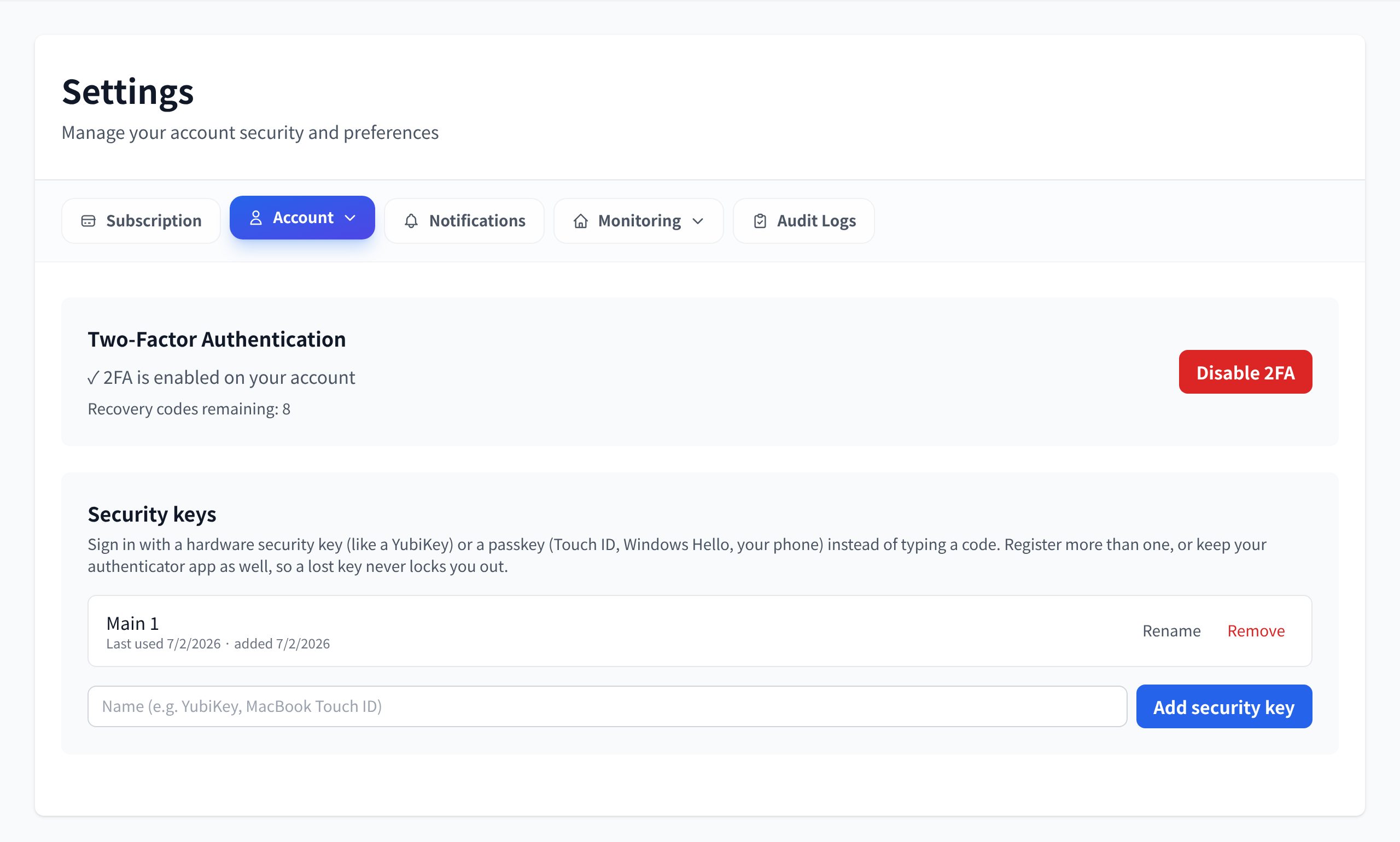
2FA your way: app, hardware key or passkey.
Turn on two-factor login with a code from any authenticator app, and add hardware security keys or passkeys on top - YubiKey, Touch ID, Windows Hello. With both set up, either method signs you in, and recovery codes cover a lost phone.
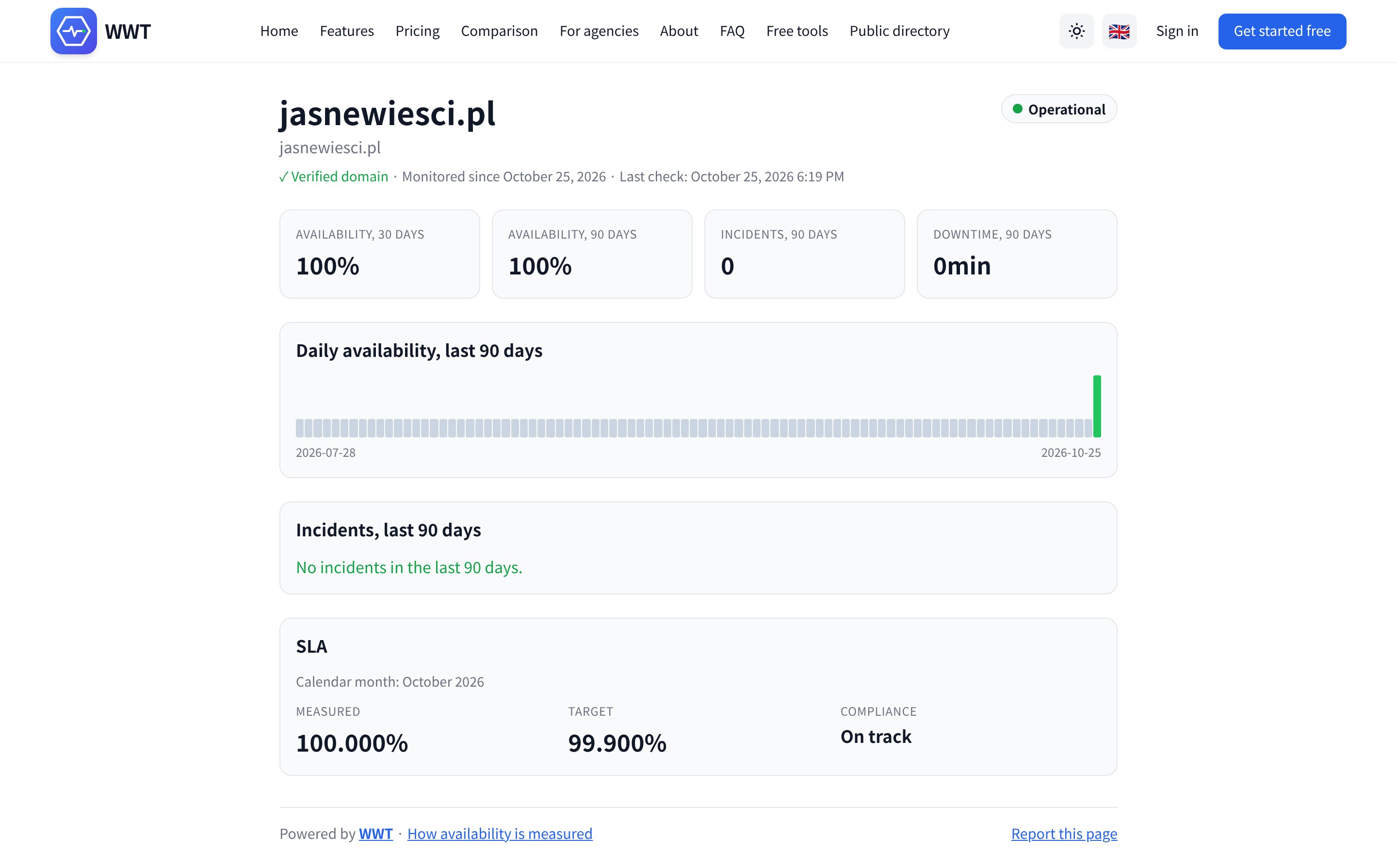
A status page under your own domain name.
Prove the domain once, with a DNS record, a file or a meta tag, and the monitor gets a server-rendered page at /status/your-domain: live state, availability over 30 and 90 days, incident history and, if you set one, the SLA for the month. You decide whether search engines may index it, and every verified page is listed in the public directory.
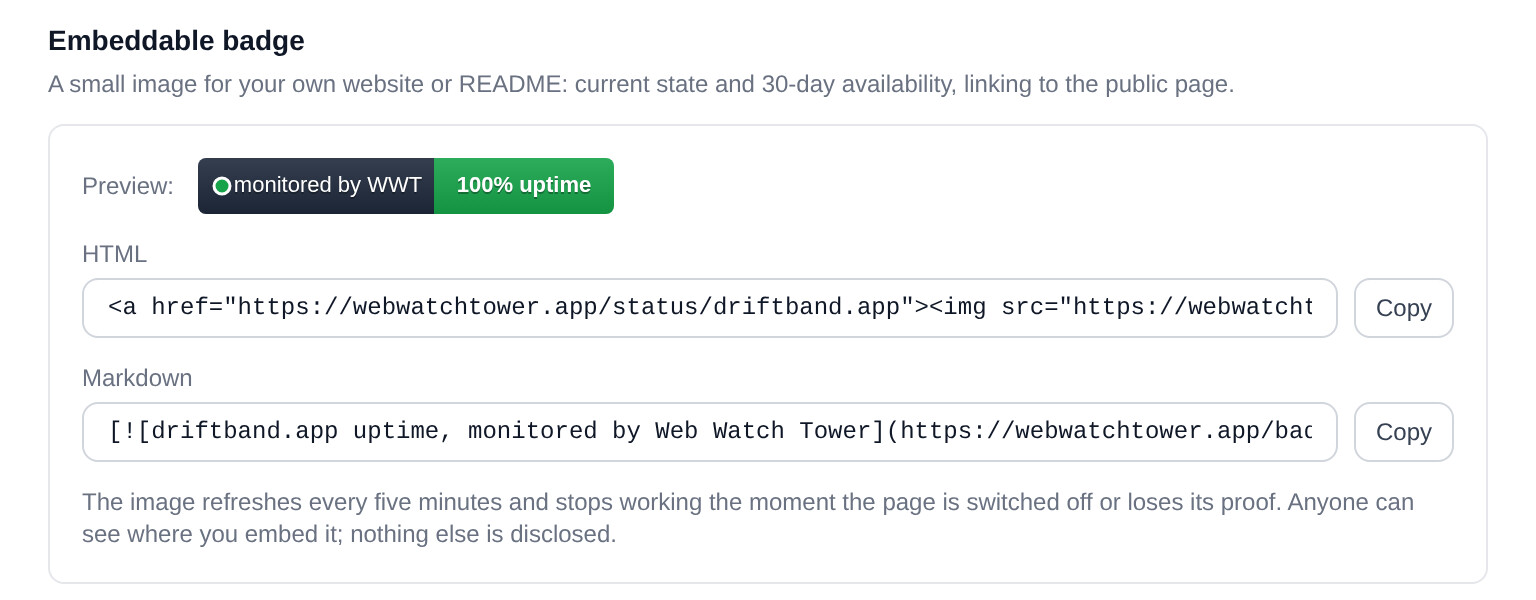
Show your uptime where your customers look.
A small image for your website or README: current state and 30-day availability, linking back to your public page. Copy the HTML or Markdown snippet from the Share dialog; the badge refreshes every five minutes and stops working the moment the page is switched off.
Six event types, routed per channel.
Every channel attached to a website chooses what it receives: uptime, response time, domain expiry, certificate expiry, TLS version changes and SLA. Page the on-call for outages, send slow-response notices to the team channel and keep renewals in the office mailbox. Response time alerts fire after a run of slow checks and clear after the same run of fast ones.
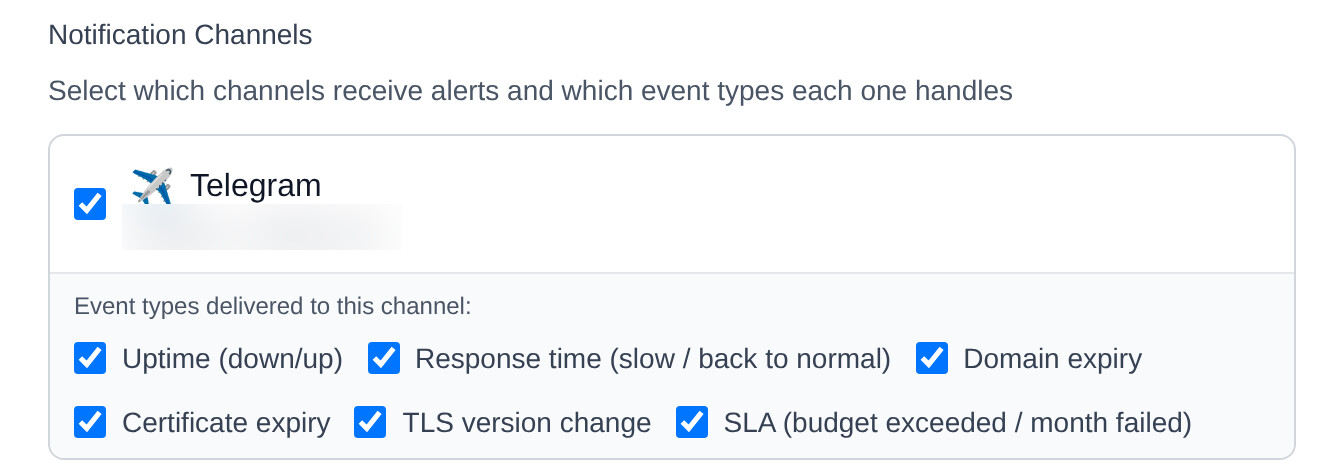
Each channel picks its event types.
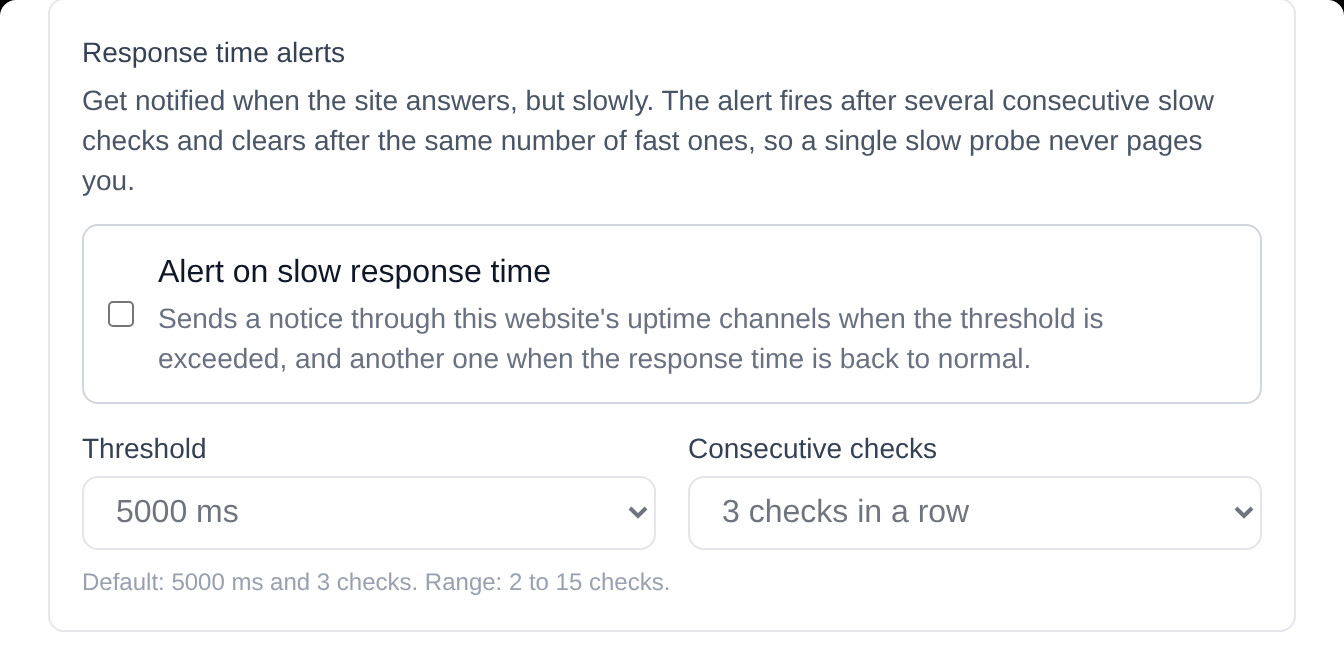
Slow-response alerts: a threshold and a run of checks.
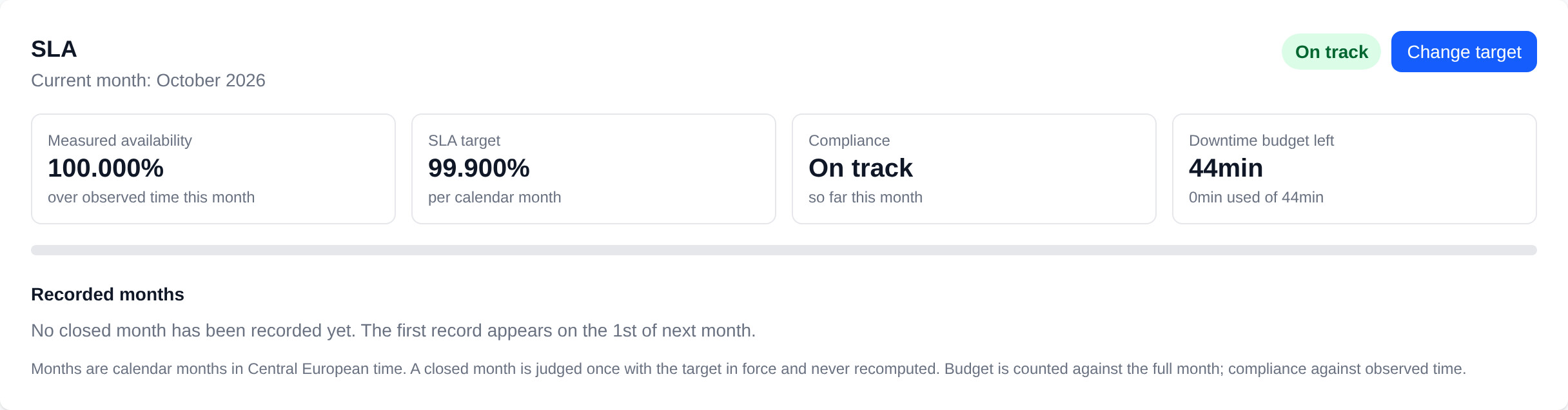
A monthly target, judged once and kept.
Set 99.9 % or any other target per monitor. WWT shows the downtime budget left for the month, records each closed month with the target in force, puts the result on the public page and in the Health Report, and alerts when the budget is used up or a month closes below target.
Simple plans, fair prices.
Start free, upgrade when you outgrow it. Cancel anytime.
Lookout
Free forever. One pair of eyes, always open.
- 2 organizations
- 5 domains per organization
- 2 team members per organization
- CSV import up to 5 rows
- Checks every 5 min
Watchtower
The full watch. Eyes on everything, every minute.
billed monthly
- 3 organizations
- 50 domains per organization
- 10 team members per organization
- CSV import up to 50 rows
- Checks every 1 min
Fortress
For guarding a whole kingdom of sites.
billed monthly
- 5 organizations
- 100 domains per organization
- 20 team members per organization
- CSV import up to 100 rows
- Checks every 1 min
Need more domains, organizations or seats? Contact us
Prices exclude VAT where applicable. Monthly or annual billing, cancel anytime.
How WWT compares to popular alternatives.
The checks WWT includes by default, next to four well-known tools. 'Limited' means the feature exists but in a narrower form, on a higher tier or through add-ons.
| Feature | WWT | StatusCake | UptimeRobot | Pingdom | Better Stack |
|---|---|---|---|---|---|
| Per-minute uptime checks | limited | limited | limited | ||
| Multi-region outage verification before alerting (all plans) | limited | limited | |||
| Response time alerts (threshold + consecutive checks) | limited | limited | limited | limited | |
| TLS version reporting | limited | ||||
| Alert when the accepted TLS version changes | limited | ||||
| Certificate expiry alerts | |||||
| Domain registrar (RDAP) monitoring | limited | ||||
| SPF / DMARC / DKIM monitoring built-in | |||||
| SLA target with monthly compliance and downtime budget | limited | limited | limited | limited | |
| Public status page per monitor | limited | ||||
| Domain ownership proof before a page goes public | |||||
| Embeddable uptime badge | limited | limited | limited | ||
| Choose which event types each channel receives | limited | limited | limited | limited | |
| Multi-tenant orgs with multi-owner | limited | limited | |||
| 9 channels: Email, Slack, Teams, Discord, Mattermost, Telegram, PagerDuty, Pushover, Webhook | limited | ||||
| Audit log of every alert & change | limited | limited | limited | ||
| Maintenance mode (suppress alerts) | limited | limited | limited | ||
| CSV bulk import | limited | limited | limited | limited | |
| Org-level website defaults template | |||||
| Per-site failure-count threshold | |||||
| 2FA: authenticator app + hardware keys / passkeys | limited | limited | limited | limited | |
| Six-language interface | |||||
| Free plan (no credit card) | limited | limited | limited |
Comparison reflects publicly documented features and pricing, reviewed in October 2026. Competitor offerings change frequently - always verify on the vendor's site before purchase.
Security is the default.
Mandatory email verification, optional 2FA with an app, a security key or a passkey, throttled login and password reset, audit log of every action, SSRF protection on every monitored URL.
Quick answers
The full FAQ covers every feature in detail.
What does WWT actually check?
How do I receive alerts?
Will I get woken up by every flaky network blip?
Is there any cost?
Are there any limits?
Recently shipped
See all updates- Improved
A refreshed home page and an updated FAQ
The home page now describes everything WWT does today: response time and TLS version change alerts, SLA targets, public status pages with the directory and the badge, and event types per channel, with new screenshots from the live application and a comparison with four popular tools reviewed this month. Sections ease in as you scroll; nothing else about the look has changed. The FAQ gained a section on public pages, sharing and SLA, plus answers about response time alerts, TLS version change alerts, the TLS grade and how availability is calculated.
- New
Public directory of verified status pages
Every verified public status page can now be found at webwatchtower.app/directory, also in Polish, German, Spanish, French and Italian under translated addresses. The list is alphabetical, searchable and deliberately not a ranking: it shows the current state and the 30-day availability of each page. A page is listed as soon as the domain is verified and the status page is set to public; switching the page off removes it at once, and anyone can report an entry for review. The status pages themselves got the site menu and footer, and there is a JSON view of the directory and of every public page for your own integrations.
- New
Embeddable status badge
A monitor with a verified public page can be shown on your own website or in a README as a small image: current state and availability over 30 days, linking to the public page. Open Share on the monitor, copy the HTML or Markdown snippet and paste it. The badge refreshes every five minutes and stops working the moment the page is switched off. Available from the Watchtower plan.
Let WWT do the checking.
Adding your first website takes about a minute. No credit card required.
Get started - freeFree tools - no account needed
Run a quick one-off check now, then let WWT watch it for you around the clock with a free account.
SSL certificate checker
Certificate chain, expiry date and negotiated TLS version for any domain.
Open toolDomain expiry checker
See when a domain registration lapses, read live from the registry via RDAP.
Open toolWebsite down checker
Is the site down for everyone or just for you? One probe from outside your network.
Open toolEmail security checker
SPF, DMARC and DKIM records, parsed with plain-language findings.
Open toolOur partners


IT consulting and managed services: cybersecurity, IT audits, infrastructure administration and monitoring.
Visit site vuln.today
Daily CVE vulnerabilities with AI analysis, priority scores, EPSS, CVSS, KEV and patch monitoring.
Visit site

Self-hosted smoke graphs for ICMP latency and packet loss monitoring, in the spirit of SmokePing.
Visit site